You are here: TSM SmartClient Menu Options – Interfaces > Profile Fund Maintenance
__________________________________________________________________________________________________
Profile Fund Maintenance
The Profile Fund Maintenance interface screen is used to facilitate a different way to use the imports/interfaces listed in replacing the fund identifier with a number or character. This may be useful in order to avoid errors in typing a more lengthy fund identifier when using the provided interface. For example, by using the Profile Fund Maintenance and setting up a fund identifier, when loading investment allocations during conversion, you could indicate the fund is “6” instead of “TICIX”.
How to access the Profile Fund Maintenance screen
Click the Interfaces menu, then click Profile Fund Maintenance. The Profile Fund Maintenance screen appears.
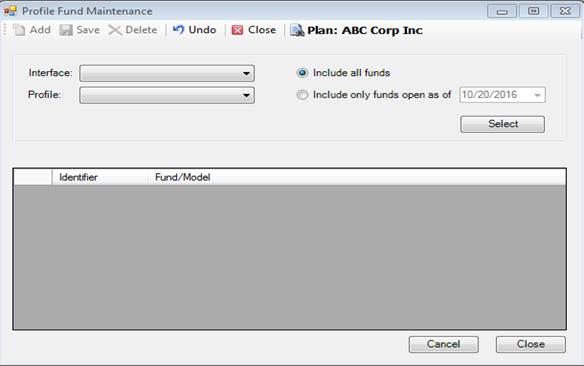
How to use the Profile Fund Maintenance screen
Use the following steps to create an abbreviated fund identifier for the various interfaces listed.
1. Click Interfaces then Profile Fund Maintenance. The Profile Fund Maintenance screen appears.
2. Select the Plan you want to use by clicking on the Plan: and searching/selecting the Plan.
3. Select the Interface and Profile for which you want to create the abbreviated fund identifiers. This is only available on the Interfaces that show in the drop down.
4. Click the button next to either Include all funds or Include only funds open as of.
a. If you selected the Include only funds open as of, then you must also enter a date in the date field.
5. Click the Select button. If an existing fund/model identifier lineup exists for the Interface/Profile combination you selected, then that lineup appears in the box below. If no lineup currently exists for the Interface/Profile combination, then you see a message that says “There are no Funds associated with the Profile selected”.
6. Click Add to add a new identifier for an existing fund/model. The Identifier field defaults to 1 (if no lineup currently exists or no number has been associated with the fund/model), or the next number in the sequence.
7. Enter the Identifier that you want to use in the future, or leave it as the number in the sequence.
8. Choose the Fund/Model from the drop down that you want the Identifier to be related to.
9. Click Add to add the next fund/model identifier abbreviation, or click Save to save all changes.
10. Click Cancel to cancel the last line items that were entered but not yet saved.
11. Highlight a line item then click Delete if you want to remove that previously saved line item.
Explanation of Fields
|
Field Name |
Field Description |
|
Interface |
The Interface is essentially the function or task that you want to view. For example, CONV-PART is intended to upload a list of participant indicative (or census) data into TSM. |
|
Profile |
The format of the Interface you are using. Both Interface and Profiles are setup and defined under Profile Maintenance. |
|
Include all Funds or Include only funds open as of ______ |
If you include all funds, this will provide you with a list of all funds/models within the selected Plan. Including only those funds opened as of a specified date will only provide you with the funds/models that were available as of the date you enter for that selected Plan. Those funds will be available on the drop down under the Fund/Model heading in the box below. |
|
Identifier |
This is whatever data you enter, which is typically some sort of shortened entry for the fund. This field also defaults to 1 whenever you click Add, and for all subsequent entries it will default to the next number in the sequence if a number was entered. For example, 1, or 2, or 3. This field also accepts characters, so you could use $ or # in place of a number. Keep in mind this identifier is only used for the Interface/Profile/Pan combo you’ve chosen. |
|
Fund/Model |
The fund that is used in the selected Plan. The funds/models listed in this drop down are based on the entry you chose above from either all funds/models in the Plan or only those funds/models that were active in the Plan as of the specified date. For example, TSIVX. |
|
Select |
Displays any current identifier lineups that exist for the Interface/Profile combo you selected. |
|
Add |
The Add button adds a new line item for your fund/model identifier lineup. |
|
Save |
Saves all current entries. |
|
Delete |
Deletes the highlighted line item. |
|
Close |
Closes the current window. |
|
Cancel |
Cancels any unsaved line items. |